
Test Slimbot live! 👋
Click and try in 2 min →
1
Hospitality · reservations · WhatsApp

Booking system for hospitality — book via WhatsApp and chat

A booking system for hospitality doesn't have to be an extra app for your guests. With Slimbot, guests book where they already are: in WhatsApp or in the chat on your website. The assistant asks for date, time, number of people and special requests, records the booking and your team sees everything in one inbox — even during the busiest service.

  • Book via WhatsApp
  • Dietary requirements and allergies
  • Groups to your team
WhatsApp Website chat Phone Instagram E-mail
Sound familiar?

Less back-and-forth messaging, fewer no-shows.

Without Slimbot

  • Message back and forth about appointments until a time suits
  • No-shows because nobody sends a reminder
  • Calendar, messages and customer data in three places

With Slimbot

  • Customers request an appointment via chat, WhatsApp or your site
  • Confirmation and reminder from your own number
  • Appointment, conversation and customer card in one overview
In practice

What comes into hospitality — and what Slimbot does

  1. "Do you have a table for 4 tonight?"

    The assistant asks for time and name, checks your rules (opening hours, maximum group size) and puts the booking in the overview.

  2. "My daughter has a nut allergy."

    The special request is added to the reservation, so the kitchen sees it.

  3. "Can we come with 18 people for a birthday?"

    Groups above your limit go as a request to your team. You decide on menu, deposit and time.

  4. "Are you open on Monday?"

    Reply during your own opening hours; outside opening hours an out-of-office message is sent automatically.

  5. "(guest forgets the booking)"

    A reminder the day before from your own number, asking them to cancel if they can't make it.

WhatsApp · Restaurant (example)Example

CustomerGood afternoon, can we dine with 4 people on Saturday at 19:00?

AssistantGood afternoon! Saturday 19:00 for 4 people is available. What name may I book under? And are there any allergies or dietary requirements?

CustomerIn the name of Bakker, one person eats vegetarian.

AssistantNoted: Saturday 19:00, 4 people, name Bakker, 1× vegetarian. You'll receive a reminder on Friday.

Fictional example; names, times and amounts are for illustration.
What it looks like

The real Slimbot inbox

Screenshots from a demo account with example conversations. Not real customers.
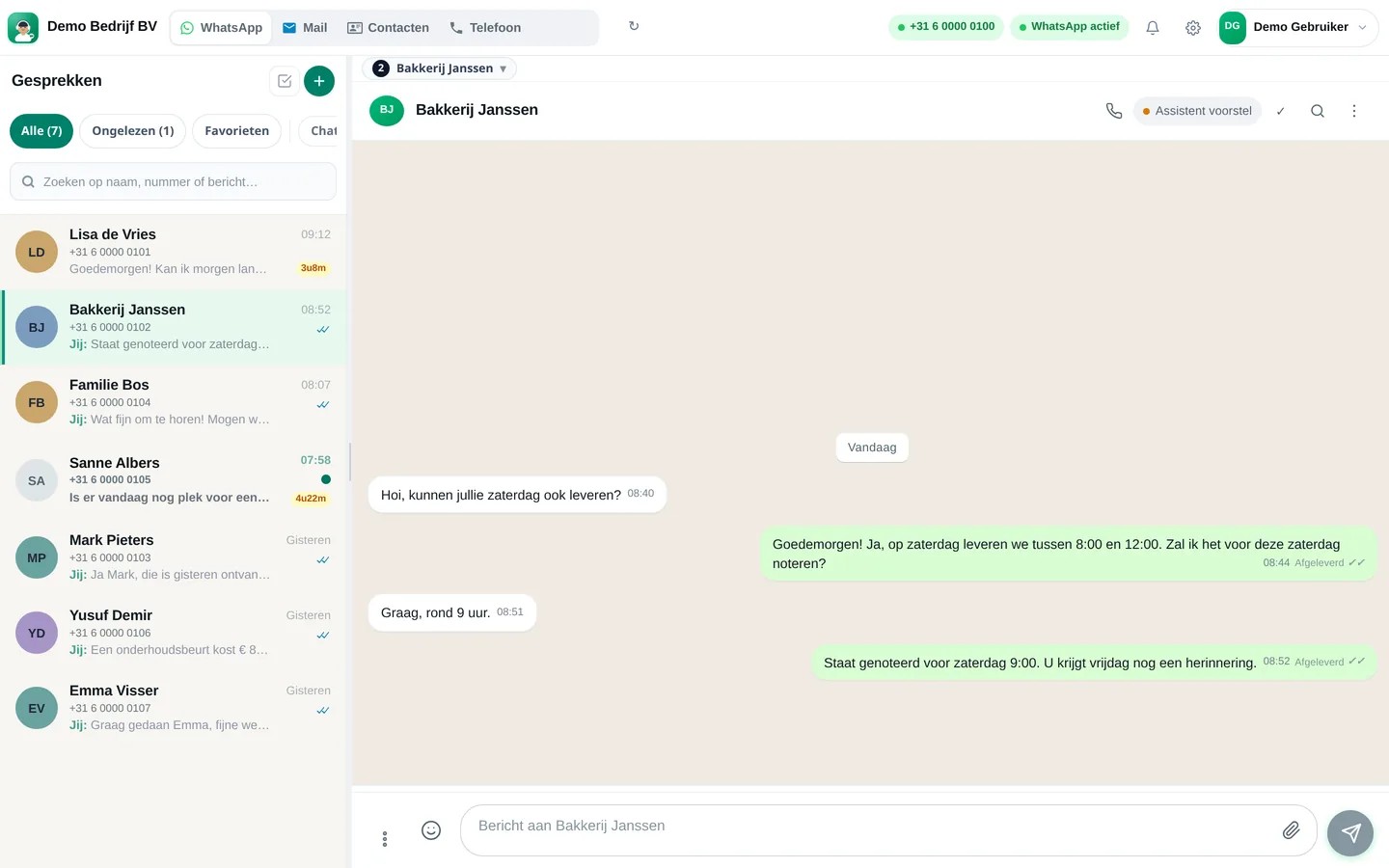
Slimbot inbox: customer asks for Saturday delivery, team confirms the appointment (example conversation)
Example · desktop
The same inbox in the app on your phone, with draft from the assistant (example conversation)
Example · app
How it works

Get started in three steps

From sign-up to working channel. You keep your own number.

1

Connect your number and calendar

Your existing business WhatsApp number and your Google Calendar. Guests keep messaging the same number.

2

Set your rules

Opening hours, kitchen hours, maximum group size and what the assistant may and may not confirm on its own.

3

Put the chat on your website

Paste one line of code or use the WordPress plugin. Bookings via the site then go through the same assistant.

Features

What you get

Features that Slimbot has today. No promises we don't keep.

Book via WhatsApp

Guests message your own number. The assistant asks for date, time and number of people and suggests a free slot based on your connected calendar.

Dietary requirements and allergies

Details such as an allergy, highchair or birthday appear as a note with the reservation — not on a loose piece of paper.

Groups to your team

Large parties or something unusual? Set the assistant not to confirm those itself but to forward them to a colleague in the inbox.

Reminder against no-shows

The day before, a WhatsApp reminder goes out from your own number, to guests with whom a conversation is already running.

Outside opening hours

An automatic welcome or away message ensures that a guest who messages at midnight still knows where they stand straight away.

One overview

Every booking with name, phone, time, status (scheduled, confirmed, completed, cancelled) and note — in the dashboard and in your Google Calendar.

Pricing

What does it cost?

Amounts from the live price list, excl. VAT. Cancel monthly. From €14.95 per month.

Try-out
Try it on our demo number
€14.95/month
excl. VAT · €18.09 incl.
No one-off costs
Cancel monthly
  • 1 Pro assistant on our test number
  • Custom persona and greeting
  • FAQ + appointment link
  • Web widget
  • Ideal for testing - not for your main number
Start Try-out
Starter
Your own verified number
€29.95/month
excl. VAT · €36.24 incl.
+ €300 one-off implementation
Cancel monthly
  • Your own verified WhatsApp number
  • 1 Pro assistant + persona
  • FAQ and knowledge base
  • Schedule appointments
  • Web widget
  • ~1,000 conversations/month, then cost price
Start Starter
Recommended
Pro
Most popular
€89.95/month
excl. VAT · €108.84 incl.
+ €300 one-off implementation
Cancel monthly
  • Everything in Starter
  • Up to 3 team members, shared inbox + routing
  • ~5,000 conversations/month
  • Agent performs actions: site, logo, photo/video analysis
  • CRM/calendar integrations
  • Analytics + priority support
Start Pro
Business
Phone + Cloud API + e-mail — tailored
On request
  • Multiple numbers and departments
  • Higher conversation and call minute bundles
  • Pro call agent included
  • Custom integrations
  • SLA + dedicated support
Request a quote

Detailed comparison on Plans. Hourly virtual team members: Rates.

FAQ

Frequently asked questions

What if it's fully booked?
The assistant only offers times you've set as available. If nothing fits, it suggests another time or passes the enquiry to your team.
Can I monitor and intervene myself?
Yes. Every conversation is in the team inbox. You or a colleague can take over the conversation at any time.
What is a reservation system for hospitality?
A system with which guests can book a table or package and with which you manage all those bookings in one place. Slimbot does this through conversations: WhatsApp, website chat and phone come together in one inbox and one appointment overview.
Does Slimbot have a table plan or till integration?
No. Slimbot is not a till system and has no table plan. It accepts bookings and manages communication with guests. If you already use a table planner, Slimbot can ensure that guest questions no longer get stuck at the phone. Contact us if you'd like to discuss an integration.
Do guests need to install an app to book?
No. Guests use WhatsApp, which they already have, or the chat on your website. No account or separate app is needed.
How do I prevent no-shows?
With a confirmation immediately after booking and a reminder the day before. Slimbot sends that reminder via WhatsApp from your own number. Want to set the text yourself? Use our free generator for appointment confirmations and reminders.
Can the assistant also arrange a group booking or buffet?
The assistant can ask the questions (number of people, date, wishes) and record them. You decide yourself whether it confirms groups above a certain number itself or forwards them to your team.
Does it also work for a chip shop or lunchroom?
Yes. For businesses that mainly do orders and takeaway, our page for cafeterias is more relevant; for restaurants with table bookings see the page for restaurants.

Finished with the text of your booking confirmation? Create it in one minute with the free confirmation and reminder generator. More about the sector: Slimbot for restaurants · for cafeterias.

Different industry? Find yours

Type your industry. We'll show the relevant page, or a brief tailored explanation of what Slimbot can do for you.

All customer conversations in one place. Starting today.

Create a free account and connect your own number, e-mail and website chat. Prefer to see it first? Schedule a short demo.
