
Test Slimbot live! 👋
Click and try in 2 min →
1
Appointments · phone · inbox · e-mail

Schedule appointments — via phone, chat and inbox

No duplicate calendars: incoming callers and website visitors book a slot, your team sees the appointment next to the conversation. Reminders go by e-mail or chat — WhatsApp only if you already use that channel.

  • AI phone answering schedules too
  • Chat and form
  • Reminders
WhatsApp E-mail Instagram Messenger Website Phone
Sound familiar?

Less back-and-forth messaging, fewer no-shows.

Without Slimbot

  • Message back and forth about appointments until a time suits
  • No-shows because nobody sends a reminder
  • Calendar, messages and customer data in three places

With Slimbot

  • Customers request an appointment via chat, WhatsApp or your site
  • Confirmation and reminder from your own number
  • Appointment, conversation and customer card in one overview
What it looks like

The real Slimbot inbox

Screenshots from a demo account with example conversations. Not real customers.
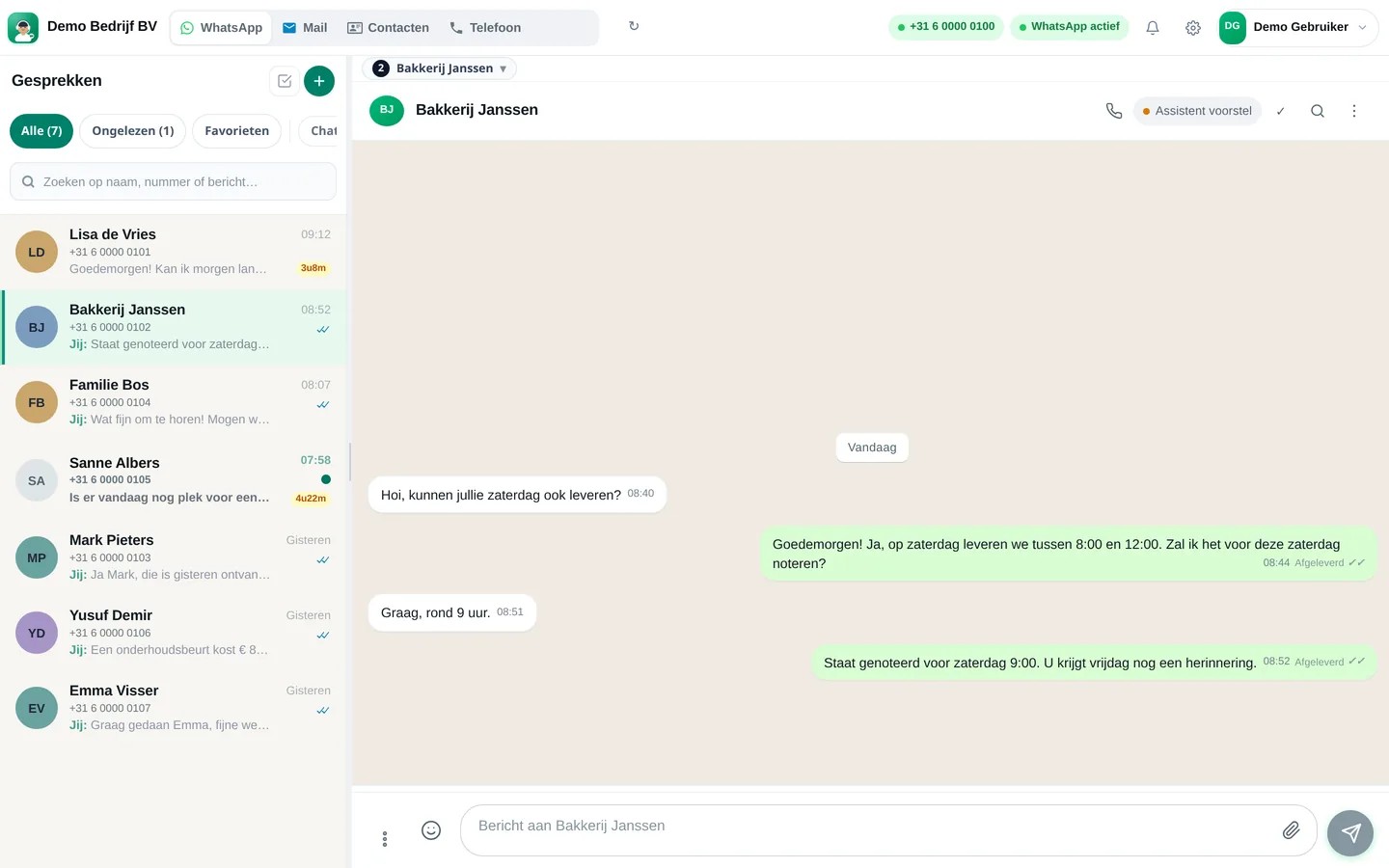
Slimbot inbox: customer asks for Saturday delivery, team confirms the appointment (example conversation)
Example · desktop
The same inbox in the app on your phone, with draft from the assistant (example conversation)
Example · app
How it works

Get started in three steps

From sign-up to working channel. You keep your own number.

1

Set availability

Opening hours, duration per appointment type and breaks.

2

Activate channels

Phone, website chat and e-mail — in the order your customers use them.

3

Inform team

New appointments in dashboard and inbox; colleagues can take over.

Features

What you get

Features that Slimbot has today. No promises we don't keep.

AI phone answering schedules too

The assistant checks available times and records a proposal — you approve or adjust.

Chat and form

Widget on your site or link in e-mail. Same calendar as phone.

Reminders

Automatic reminder by e-mail or chat to reduce no-shows.

Team inbox context

Who called, what was agreed and which notes — on one customer card.

Calendar integration

Works with popular calendars; we help with the first connection.

WhatsApp optional

Confirmation via WhatsApp if that channel is active in your inbox.

From €14.95 per month

Excl. VAT, from the live price list. Start with a free account; a subscription only begins when you accept it.

View all prices
FAQ

Frequently asked questions

Does this replace my calendar app?
Slimbot connects and synchronises; you often keep your existing calendar as the source.
Can the AI schedule everything itself?
The AI suggests and books only within rules you set. Doubtful cases go to your team.
Does this work with AI phone answering?
Yes. Callers hear immediately whether a time is available; transcript and appointment are in Slimbot.

All customer conversations in one place. Starting today.

Create a free account and connect your own number, e-mail and website chat. Prefer to see it first? Schedule a short demo.
