
Test Slimbot live! 👋
Click and try in 2 min →
1
Booking system · WhatsApp · diary

Reservation system: accept reservations via WhatsApp, chat and phone

A booking system doesn't have to be an extra app or complicated form. With Slimbot, customers book where they already are: in WhatsApp, in the chat on your website or on the phone. An assistant asks for date, time, number of people or the service required, checks your connected calendar and records the booking. Your team sees everything in one inbox.

  • Book via WhatsApp
  • Via the chat on your website
  • On the phone too
WhatsApp Website chat Phone E-mail
Sound familiar?

Less back-and-forth messaging, fewer no-shows.

Without Slimbot

  • Message back and forth about appointments until a time suits
  • No-shows because nobody sends a reminder
  • Calendar, messages and customer data in three places

With Slimbot

  • Customers request an appointment via chat, WhatsApp or your site
  • Confirmation and reminder from your own number
  • Appointment, conversation and customer card in one overview
What it looks like

The real Slimbot inbox

Screenshots from a demo account with example conversations. Not real customers.
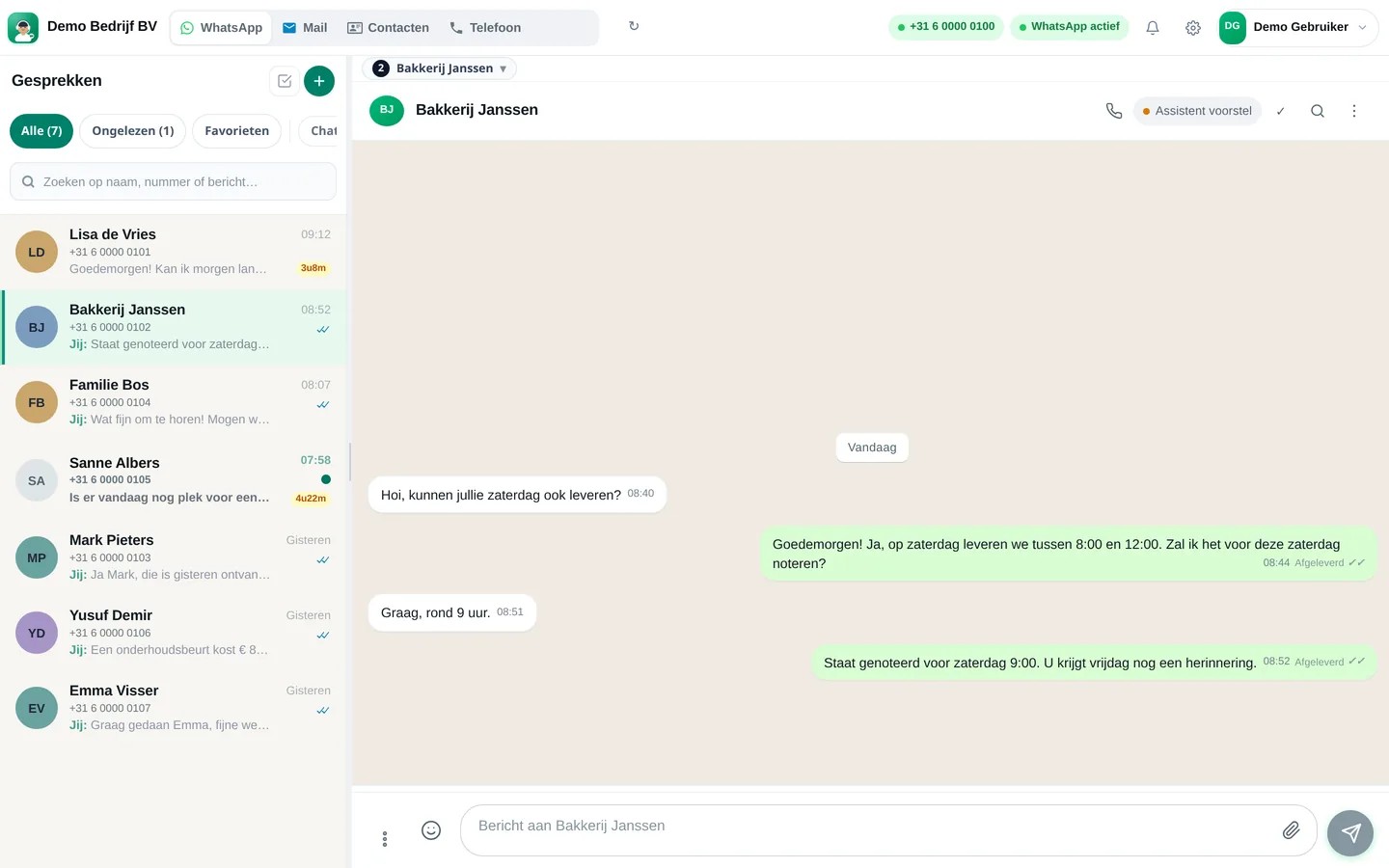
Slimbot inbox: customer asks for Saturday delivery, team confirms the appointment (example conversation)
Example · desktop
The same inbox in the app on your phone, with draft from the assistant (example conversation)
Example · app
How it works

Get started in three steps

From sign-up to working channel. You keep your own number.

1

Connect number and calendar

Your business WhatsApp number and your Google Calendar. Customers keep messaging the same number.

2

Set your rules

Opening hours, duration per service, maximum group size and what the assistant may confirm itself.

3

Add the chat to your website

One line of code or the WordPress plugin. Bookings via the website go through the same assistant.

Features

What you get

Features that Slimbot has today. No promises we don't keep.

Book via WhatsApp

Customers message your own business number. The assistant suggests an available slot from your connected Google Calendar and adds the booking as soon as the customer chooses.

Via the chat on your website

The same booking method works in the chat on your site. You place the chat window with one piece of code or the WordPress plugin.

On the phone too

With AI phone answering, an assistant picks up when you're busy and records the booking, with a summary in the inbox.

One overview

Per booking: name, phone, service or number of people, date, time, status and note. In the dashboard and in your Google Calendar.

Confirmation and reminder

Confirm with one click via WhatsApp and have a reminder sent automatically the day before from your own number.

Exceptions to your team

Groups, special requests or uncertain cases are not confirmed by the assistant: they go to a colleague in the shared inbox.

What is a booking system?

A booking system is a way to accept customer bookings and manage them in one place. That can be a table in a restaurant, an appointment at the hairdresser, a treatment in a practice, a lesson, a meeting room or a rental item.

Most systems work with an online calendar where the customer clicks a time slot themselves. That works, but many customers prefer a different way: they send a message or make a quick call. Slimbot is built for that way of booking: through a conversation.

Booking through a conversation instead of a form

A customer messages: "Do you have space on Saturday at seven o'clock for four people?" Without a system, someone has to read that, check the calendar and message back, often hours later. With Slimbot, the assistant responds immediately, asks what else it needs to know (name, number, special requirements) and puts the booking in your calendar. Your team sees the conversation and can always take over.

Because WhatsApp, website chat, phone and e-mail are in the same inbox, no booking gets lost between channels. A customer who calls first and messages later has one customer card with the complete history.

By industry

  • Hospitality: table reservations, dietary requirements and groups. See the reservation system for hospitality.
  • Hairdressers, salons and beauty: appointments per treatment and team member. See salon software.
  • Practices and care: schedule appointments and send reminders to reduce no-shows.
  • Service providers and installers: schedule a visit or introduction after a request.
  • Hire, lessons and workshops: accept registrations and answer questions.

What Slimbot is not

Slimbot is not a till system and has no table plan or advance payment when booking. If you already work with a table planner or booking software, Slimbot can ensure that questions and bookings coming in via WhatsApp and phone don't get stuck. If you'd like to discuss an integration, please contact us.

Reduce no-shows

A clear confirmation straight after booking and a reminder the day before save many empty seats. Slimbot sends that reminder via WhatsApp from your own number, to customers with whom a conversation is already running. You write the text yourself, or use our free appointment confirmation generator.

Pricing

What does it cost?

Amounts from the live price list, excl. VAT. Cancel monthly. From €14.95 per month.

Try-out
Try it on our demo number
€14.95/month
excl. VAT · €18.09 incl.
No one-off costs
Cancel monthly
  • 1 Pro assistant on our test number
  • Custom persona and greeting
  • FAQ + appointment link
  • Web widget
  • Ideal for testing - not for your main number
Start Try-out
Starter
Your own verified number
€29.95/month
excl. VAT · €36.24 incl.
+ €300 one-off implementation
Cancel monthly
  • Your own verified WhatsApp number
  • 1 Pro assistant + persona
  • FAQ and knowledge base
  • Schedule appointments
  • Web widget
  • ~1,000 conversations/month, then cost price
Start Starter
Recommended
Pro
Most popular
€89.95/month
excl. VAT · €108.84 incl.
+ €300 one-off implementation
Cancel monthly
  • Everything in Starter
  • Up to 3 team members, shared inbox + routing
  • ~5,000 conversations/month
  • Agent performs actions: site, logo, photo/video analysis
  • CRM/calendar integrations
  • Analytics + priority support
Start Pro
Business
Phone + Cloud API + e-mail — tailored
On request
  • Multiple numbers and departments
  • Higher conversation and call minute bundles
  • Pro call agent included
  • Custom integrations
  • SLA + dedicated support
Request a quote

Detailed comparison on Plans. Hourly virtual team members: Rates.

FAQ

Frequently asked questions

What is a booking system?
A system with which customers book a table, appointment or place and with which you manage all those reservations in one place. Slimbot does this through conversations: WhatsApp, website chat and phone come together in one inbox and one diary.
Do customers need to install an app?
No. They use WhatsApp, which they already have, the chat on your website or the phone. No account or separate app needed.
Does it work with my calendar?
Slimbot connects with Google Calendar. The assistant sees which times are available and adds new bookings to it.
Does Slimbot have a table plan or till integration?
No. Slimbot takes bookings and handles communication with guests and customers. A table plan or till integration is not included.
Can the assistant accept group reservations?
It can ask questions and record them. You decide whether it confirms groups above a certain number itself or forwards them to your team.
What does a Slimbot booking system cost?
Reservations are included in the Slimbot plans. The current amounts on this page come from our live price list. You start with a free account.

Specific to your industry: hospitality booking system · salon software · booking system on your website. Need text for the confirmation? Use the free confirmation generator.

All customer conversations in one place. Starting today.

Create a free account and connect your own number, e-mail and website chat. Prefer to see it first? Schedule a short demo.
