
Test Slimbot live! 👋
Click and try in 2 min →
1
Appointment scheduler · WhatsApp · calendar

Appointment scheduler — customers book themselves via WhatsApp

Most customers don't want to fill in a form — they simply send a message: "Can I come by on Thursday?" With Slimbot's appointment planner, an assistant answers that question immediately, checks your connected calendar for available times and books the appointment. You keep track in one online appointment system.

  • Schedule appointment via WhatsApp
  • One appointment overview
  • Confirm with one click
WhatsApp E-mail Instagram Messenger Website Phone
Sound familiar?

Less back-and-forth messaging, fewer no-shows.

Without Slimbot

  • Message back and forth about appointments until a time suits
  • No-shows because nobody sends a reminder
  • Calendar, messages and customer data in three places

With Slimbot

  • Customers request an appointment via chat, WhatsApp or your site
  • Confirmation and reminder from your own number
  • Appointment, conversation and customer card in one overview
What it looks like

The real Slimbot inbox

Screenshots from a demo account with example conversations. Not real customers.
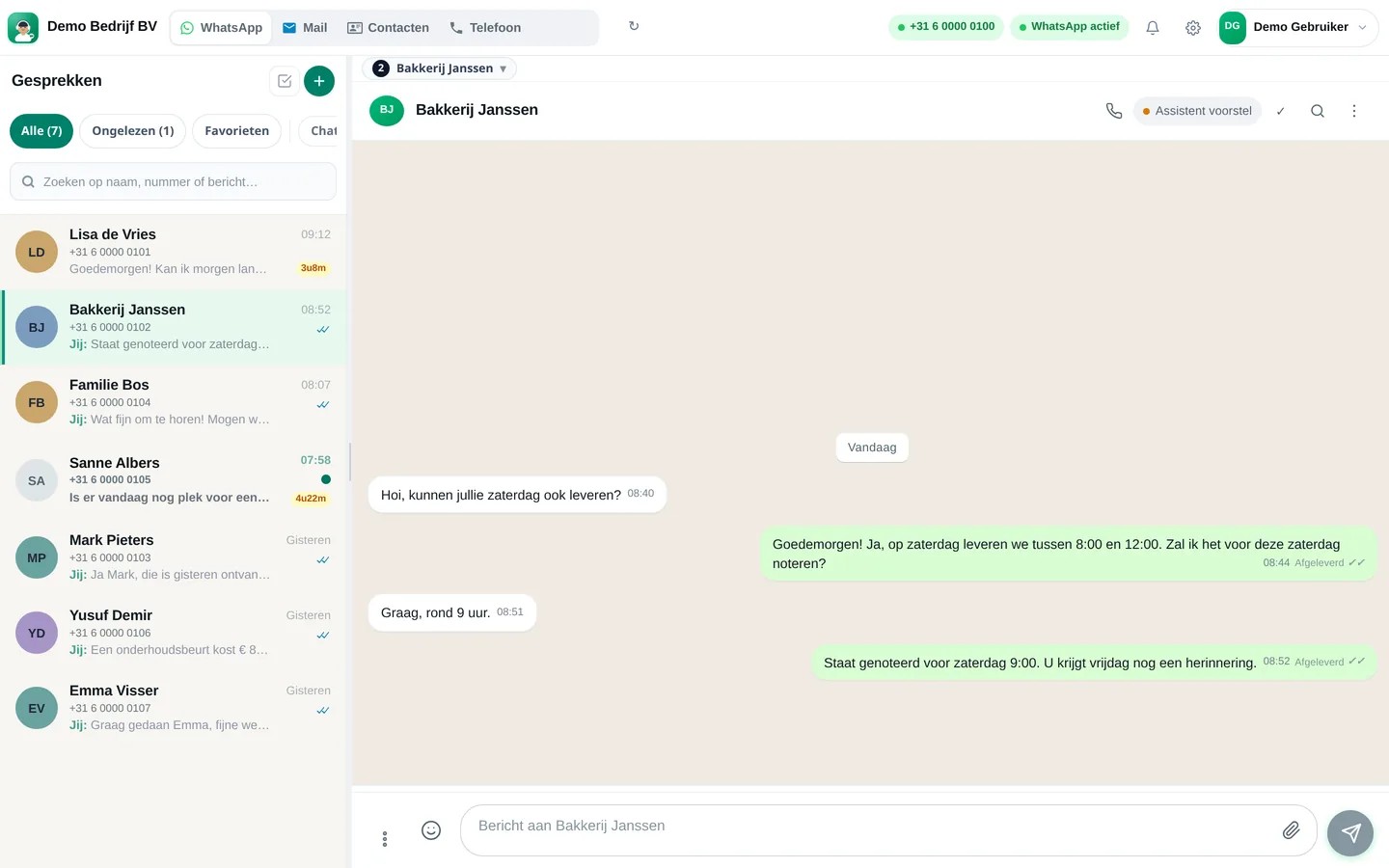
Slimbot inbox: customer asks for Saturday delivery, team confirms the appointment (example conversation)
Example · desktop
The same inbox in the app on your phone, with draft from the assistant (example conversation)
Example · app
How it works

Get started in three steps

From sign-up to working channel. You keep your own number.

1

Create account

Register and connect your business WhatsApp number. Your customers won't notice the switch.

2

Connect calendar

Connect your Google Calendar so the assistant can see available times and schedule appointments.

3

Set services and times

Tell the assistant which appointment types you have, how long they take and when you're open.

Features

What you get

Features that Slimbot has today. No promises we don't keep.

Schedule appointment via WhatsApp

Customers message your own business number. The assistant suggests available times from your connected Google Calendar and adds the appointment as soon as the customer chooses.

One appointment overview

Name, phone, service, date, time, duration, status and note per appointment. Filter and search in the dashboard, on desktop and phone.

Confirm with one click

Every appointment has a "Confirm via WhatsApp" button with a ready-made message — you can edit it before sending.

Reminder 24 hours in advance

Automatic WhatsApp reminder one day in advance, from your own number, for customers with whom a conversation is already running.

Also via website and phone

The same assistant works in the chat on your website and — with AI phone answering — on the phone. One calendar, no double bookings between channels.

Your team stays in control

You decide which appointments the assistant may schedule itself. Uncertain cases are forwarded to a colleague in the shared inbox.

Pricing

What does it cost?

Amounts from the live price list, excl. VAT. Cancel monthly. From €14.95 per month.

Try-out
Try it on our demo number
€14.95/month
excl. VAT · €18.09 incl.
No one-off costs
Cancel monthly
  • 1 Pro assistant on our test number
  • Custom persona and greeting
  • FAQ + appointment link
  • Web widget
  • Ideal for testing - not for your main number
Start Try-out
Starter
Your own verified number
€29.95/month
excl. VAT · €36.24 incl.
+ €300 one-off implementation
Cancel monthly
  • Your own verified WhatsApp number
  • 1 Pro assistant + persona
  • FAQ and knowledge base
  • Schedule appointments
  • Web widget
  • ~1,000 conversations/month, then cost price
Start Starter
Recommended
Pro
Most popular
€89.95/month
excl. VAT · €108.84 incl.
+ €300 one-off implementation
Cancel monthly
  • Everything in Starter
  • Up to 3 team members, shared inbox + routing
  • ~5,000 conversations/month
  • Agent performs actions: site, logo, photo/video analysis
  • CRM/calendar integrations
  • Analytics + priority support
Start Pro
Business
Phone + Cloud API + e-mail — tailored
On request
  • Multiple numbers and departments
  • Higher conversation and call minute bundles
  • Pro call agent included
  • Custom integrations
  • SLA + dedicated support
Request a quote

Detailed comparison on Plans. Hourly virtual team members: Rates.

FAQ

Frequently asked questions

What is an appointment scheduler?
Software with which customers can make an appointment themselves and you manage all your appointments in one place. With Slimbot the scheduling happens in a conversation: the customer messages or chats, the assistant suggests available times and records the appointment.
Can I have appointments scheduled via WhatsApp?
Yes. That's exactly what Slimbot is made for. You connect your own business WhatsApp number; the assistant answers appointment requests and puts them in your connected calendar.
Is there also an appointments app for my phone?
Slimbot works in the browser and can be installed as an app on your phone (installable web app). There you see appointments, conversations and notifications. Your customers don't need an app: they use WhatsApp or the chat on your site.
Does Slimbot have a clickable booking calendar for customers?
Slimbot schedules appointments through conversations rather than through a separate calendar with clickable slots. For most customers this is faster, because they're already messaging. If you really want a calendar widget next to the chat, please get in touch: we'll look at an integration together.
Which calendar does the appointment planner use?
You can connect Google Calendar yourself from the dashboard. If you use a different calendar programme, we'll help with the initial connection or you can keep track of appointments in the Slimbot overview itself.
What does an online appointment system cost?
The plans and prices below come directly from our current price list. Appointment scheduling is included in the platform; you do not pay a separate price per appointment.

Would you like a good confirmation or reminder text first? Try the free appointment confirmation generator. Prefer to talk first? Schedule a 30-minute video call.

All customer conversations in one place. Starting today.

Create a free account and connect your own number, e-mail and website chat. Prefer to see it first? Schedule a short demo.
