
Test Slimbot live! 👋
Click and try in 2 min →
1
Scheduling · appointments · messages

Create a schedule online — for appointments, messages and follow-up

Planning often goes wrong on the small things: a customer who still needed a confirmation, a quote that needed following up, a message that had to go out on Monday. With Slimbot you make that planning online, in one place: appointments, scheduled messages, reminders and social posts — and your team sees what is planned.

  • Appointments in one overview
  • Schedule messages in advance
  • Automatic reminder
WhatsApp E-mail Instagram Messenger Website Phone
Sound familiar?

Less back-and-forth messaging, fewer no-shows.

Without Slimbot

  • Message back and forth about appointments until a time suits
  • No-shows because nobody sends a reminder
  • Calendar, messages and customer data in three places

With Slimbot

  • Customers request an appointment via chat, WhatsApp or your site
  • Confirmation and reminder from your own number
  • Appointment, conversation and customer card in one overview
What it looks like

The real Slimbot inbox

Screenshots from a demo account with example conversations. Not real customers.
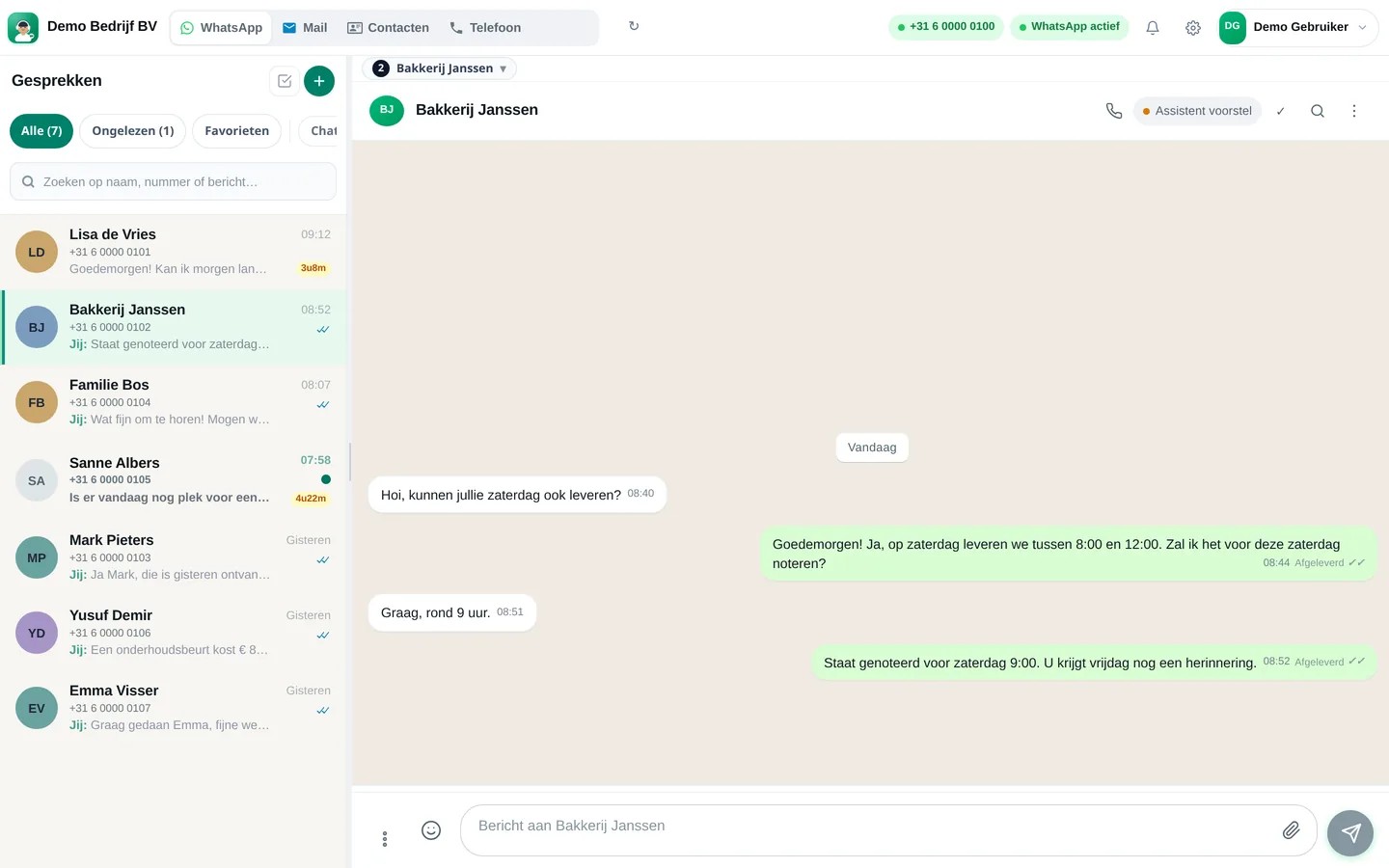
Slimbot inbox: customer asks for Saturday delivery, team confirms the appointment (example conversation)
Example · desktop
The same inbox in the app on your phone, with draft from the assistant (example conversation)
Example · app
How it works

Get started in three steps

From sign-up to working channel. You keep your own number.

1

Create account

Register for free and connect your business WhatsApp number or mailbox.

2

Connect calendar

Connect your Google Calendar, so that appointments and free times are the same everywhere.

3

Set initial schedule

Put your appointments in, schedule a first message in advance and set the reminder.

Features

What you get

Features that Slimbot has today. No promises we don't keep.

Appointments in one overview

All appointments with customer, service, time, duration and status. Appointments that the assistant makes via WhatsApp or chat are added automatically.

Schedule messages in advance

Write a message now and choose when it will be sent. Handy for a follow-up, a thank-you or an update at a fixed moment.

Automatic reminder

A WhatsApp reminder a day before the appointment from your own number, for customers with whom a conversation is already running. Fewer no-shows without manual work.

Schedule social posts

Schedule messages for your connected Facebook and Instagram page by date and time, so you don't have to post yourself every day.

Google Calendar as foundation

Connect your Google Calendar. What is blocked there will not be double-booked by the assistant.

Schedule together

Assign conversations to colleagues and notes on the customer card: the next person knows what has been planned and agreed.

Pricing

What does it cost?

Amounts from the live price list, excl. VAT. Cancel monthly. From €14.95 per month.

Try-out
Try it on our demo number
€14.95/month
excl. VAT · €18.09 incl.
No one-off costs
Cancel monthly
  • 1 Pro assistant on our test number
  • Custom persona and greeting
  • FAQ + appointment link
  • Web widget
  • Ideal for testing - not for your main number
Start Try-out
Starter
Your own verified number
€29.95/month
excl. VAT · €36.24 incl.
+ €300 one-off implementation
Cancel monthly
  • Your own verified WhatsApp number
  • 1 Pro assistant + persona
  • FAQ and knowledge base
  • Schedule appointments
  • Web widget
  • ~1,000 conversations/month, then cost price
Start Starter
Recommended
Pro
Most popular
€89.95/month
excl. VAT · €108.84 incl.
+ €300 one-off implementation
Cancel monthly
  • Everything in Starter
  • Up to 3 team members, shared inbox + routing
  • ~5,000 conversations/month
  • Agent performs actions: site, logo, photo/video analysis
  • CRM/calendar integrations
  • Analytics + priority support
Start Pro
Business
Phone + Cloud API + e-mail — tailored
On request
  • Multiple numbers and departments
  • Higher conversation and call minute bundles
  • Pro call agent included
  • Custom integrations
  • SLA + dedicated support
Request a quote

Detailed comparison on Plans. Hourly virtual team members: Rates.

FAQ

Frequently asked questions

How do I make a good plan?
First write down everything that needs to happen, estimate how long each task takes, determine what is fixed (appointments, deadlines) and plan the rest around it. Keep space free for unexpected matters — reckon with about a quarter buffer — and review the planning at the end of each day.
Can I create a schedule online for free?
For a personal weekly schedule, a free calendar or spreadsheet is sufficient. You can try Slimbot for free; it is intended for scheduling around customers: appointments, scheduled messages, reminders and follow-up, together with your team.
Is Slimbot suitable for project planning or a staff rota?
No. Slimbot has no Gantt charts or rota function. It schedules everything related to customer contact. For a staff rota, there is a step-by-step guide on our page about creating a rota.
Can I schedule messages to be sent automatically at a later time?
Yes. You can schedule messages, and appointment reminders go out automatically one day in advance. Do follow WhatsApp's rules: only send scheduled messages to people who have already been in contact with you.
How do I prevent appointments from being double-booked?
Use one calendar as the source. If you connect Google Calendar, the assistant checks it before suggesting a time, whether the request comes in via WhatsApp, chat or phone.
What is the difference between a schedule and a rota?
A rota divides shifts over people (who works when). A planning divides work over time (what happens when). Slimbot helps with the second, for everything related to customers.

Schedule a confirmation or reminder? First create the text with the free template generator. Also useful: appointment scheduler via WhatsApp.

All customer conversations in one place. Starting today.

Create a free account and connect your own number, e-mail and website chat. Prefer to see it first? Schedule a short demo.
